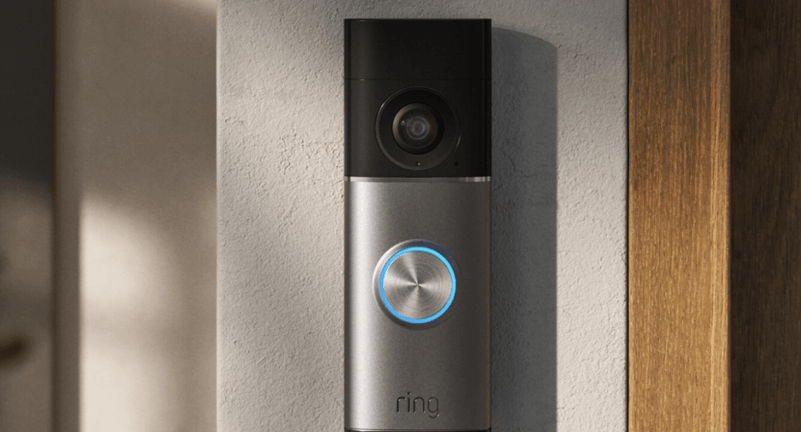

A video doorbell is a smart home device that combines a traditional doorbell with a built-in camera, microphone, speaker, and internet connectivity. It allows homeowners to see, hear, and communicate with visitors through a smartphone, tablet, or computer, whether they are at home or away.
Video doorbells have become an important part of modern home security by providing real-time notifications, live video, motion detection, and recorded footage. This guide explains what a video doorbell is, how it works, its key features, benefits, applications, challenges, and best practices.
What Is a Video Doorbell?
Definition of a Video Doorbell
A video doorbell is an internet-connected security device installed near an entrance that captures video and audio when someone approaches or presses the doorbell. It enables remote monitoring and two-way communication through a companion mobile application.
Video doorbells are commonly used in houses, apartments, offices, and small businesses.
How Does a Video Doorbell Work?
Motion Detection
Built-in sensors detect movement near the entrance and can trigger alerts or start recording.
Video Capture
The integrated camera records live or event-based video of visitors and activity around the doorway.
Two-Way Audio
A built-in microphone and speaker allow users to communicate with visitors in real time.
Wi-Fi Connectivity
The device connects to a wireless network, enabling remote access and notifications.
Mobile App Integration
Users can view live video, receive alerts, review recordings, and adjust settings through a compatible app.
Key Features of a Video Doorbell
Live Video Streaming
Watch real-time video from your front door using a connected device.
Motion Alerts
Receive notifications when movement is detected near your entrance.
Two-Way Communication
Speak with delivery personnel, guests, or visitors without opening the door.
Night Vision
Many models provide clear video in low-light or nighttime conditions.
Video Recording
Store recorded footage locally or in cloud storage, depending on the model and configuration.
Visitor History
Review previous events and recordings to monitor activity around your property.
Smart Home Integration
Many video doorbells work with compatible smart displays, security systems, lighting, and voice assistants.
Benefits of a Video Doorbell
Enhanced Home Security
Monitor activity at your front door and increase awareness of visitors and deliveries.
Remote Monitoring
View your entrance from virtually anywhere using an internet-connected device.
Convenient Communication
Talk to visitors without needing to be physically present at the door.
Package Monitoring
Keep an eye on deliveries and receive notifications when activity is detected.
Peace of Mind
Stay informed about who visits your property throughout the day.
Applications of Video Doorbells
Residential Homes
Improve home security and monitor visitors.
Apartments
Screen visitors before granting access.
Vacation Properties
Check on entrances while away from the property.
Small Businesses
Monitor customer arrivals and deliveries.
Offices
Track visitors and improve entry management.
Rental Properties
Provide additional security for entrances and shared access points.
Challenges of Video Doorbells
Wi-Fi Dependence
Remote viewing and notifications generally require a reliable internet connection.
Power Requirements
Some models use rechargeable batteries, while others connect to existing doorbell wiring.
Privacy Considerations
Proper placement and responsible use are important to respect the privacy of neighbors and visitors.
Subscription Features
Certain devices may require an optional subscription to access extended video history or advanced features.
Tips for Choosing a Video Doorbell
Select the Right Power Option
Choose between a battery-powered model for easier installation or a wired model for continuous power, depending on your home’s setup.
Consider Video Quality
Look for clear image quality that performs well during both daytime and nighttime conditions.
Evaluate Motion Detection
Choose a device with adjustable motion settings to reduce unnecessary alerts.
Check Storage Options
Review whether recordings are stored locally, in the cloud, or through both methods.
Verify Smart Home Compatibility
If you already use smart home devices, ensure the doorbell integrates with your preferred ecosystem.
Review Mobile App Features
A reliable app should provide live viewing, notifications, event history, and easy device management.
Best Practices for Using a Video Doorbell
Install at the Correct Height
Position the camera to capture visitors clearly while covering the desired viewing area.
Secure Your Account
Use a strong password and enable multi-factor authentication if available.
Keep Software Updated
Install firmware and app updates to improve security and performance.
Adjust Motion Zones
Configure motion detection areas to reduce alerts caused by passing traffic or other non-essential activity.
Maintain the Device
Clean the camera lens periodically and check battery levels or wiring to ensure reliable operation.
Advantages of Video Doorbells
Increased Security Awareness
Receive timely notifications about activity at your entrance.
Convenient Visitor Management
Interact with visitors even when you are away from home.
Delivery Monitoring
Monitor packages and confirm deliveries.
Smart Home Integration
Connect with compatible security systems, lighting, and other smart home devices.
Frequently Asked Questions
What is a video doorbell?
A video doorbell is a smart security device with a camera, microphone, and internet connectivity that allows users to monitor and communicate with visitors remotely.
Do video doorbells record all the time?
Recording behavior depends on the model and settings. Some devices record when motion is detected or when the doorbell is pressed, while others may support continuous recording if configured and supported.
Can I use a video doorbell without existing doorbell wiring?
Yes. Many video doorbells are available in battery-powered versions that do not require existing doorbell wiring.
Do video doorbells work at night?
Yes. Most modern video doorbells include night vision technology that allows them to capture video in low-light conditions.
Can I access my video doorbell when I am away from home?
Yes. As long as the device is connected to the internet and your mobile device has internet access, you can typically view live video, receive alerts, and communicate with visitors remotely.
Conclusion
Video doorbells combine convenience, communication, and security into a single smart home device. With features such as live video, motion detection, two-way audio, night vision, and remote monitoring, they help homeowners and businesses stay informed about activity at their entrances. By choosing a model that fits your installation needs, maintaining secure account settings, and keeping the device updated, you can enhance the safety and convenience of your property while improving everyday visitor management.